Cathaleen Curtiss – » As I see it...

Masthead header


A Photo a day…

As I watched the fireworks welcome in the New Year, I made a resolution to make a photo a day in 2011.  It seemed easy enough.  It should be a simple and easy resolution to keep. Heck, I already had Jan 1, 2011 done, only 364 days left!

Fireworks over the Niagara Mohawk Building in downtown Buffalo, NY, welcome in the New Year, 2011. Thus begins my resolution to make a photo a day. iPhone 3GS camera edited with PhotoShop Express.
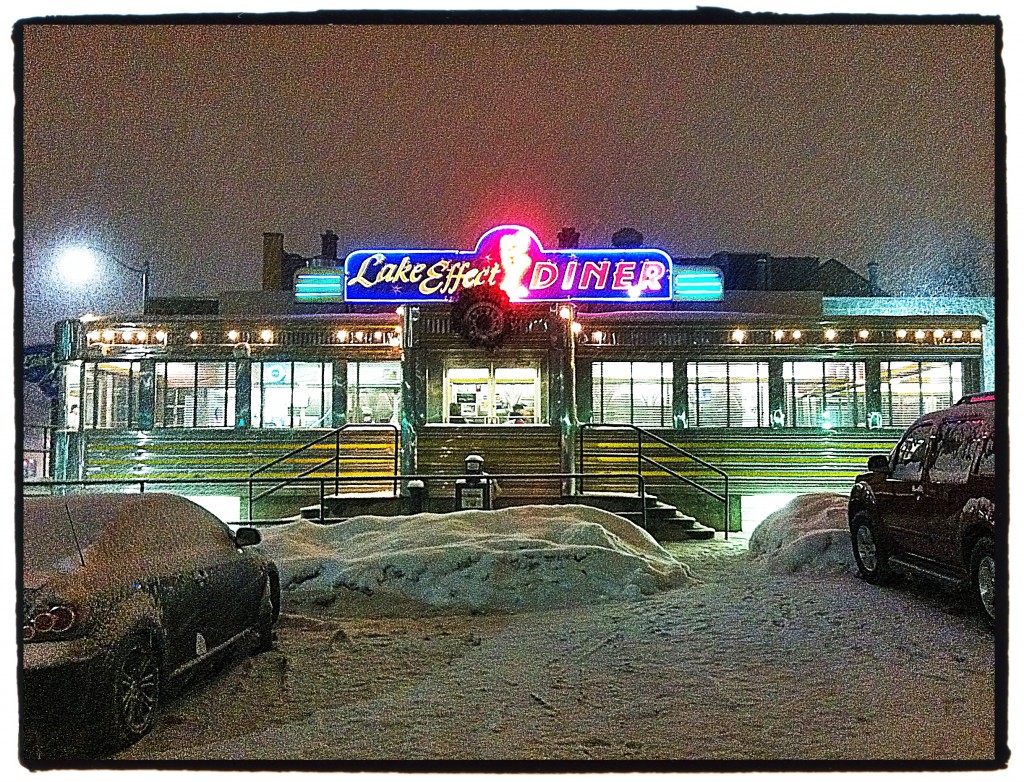
Jan 23, 2011 The Lake Effect Diner. Dinner out after attending an art exhibit at 2.5 degrees with lake effect snow. 🙂 I remember still thinking "how beautiful the new snow was." iPhone 3GS camera with ProHDR app edited with PhotoShop Express.

Here I am on April 10, 2011, so far I have kept my commitment but it is getting more and more difficult. It is sunny out today but still the ground is wet, not much life has sprung and there are some lingering piles of dirty snow around.   Some days the images I see or capture are just not very interesting, but I make one anyway.  Thank goodness I didn’t say I would make a GOOD photo a day.
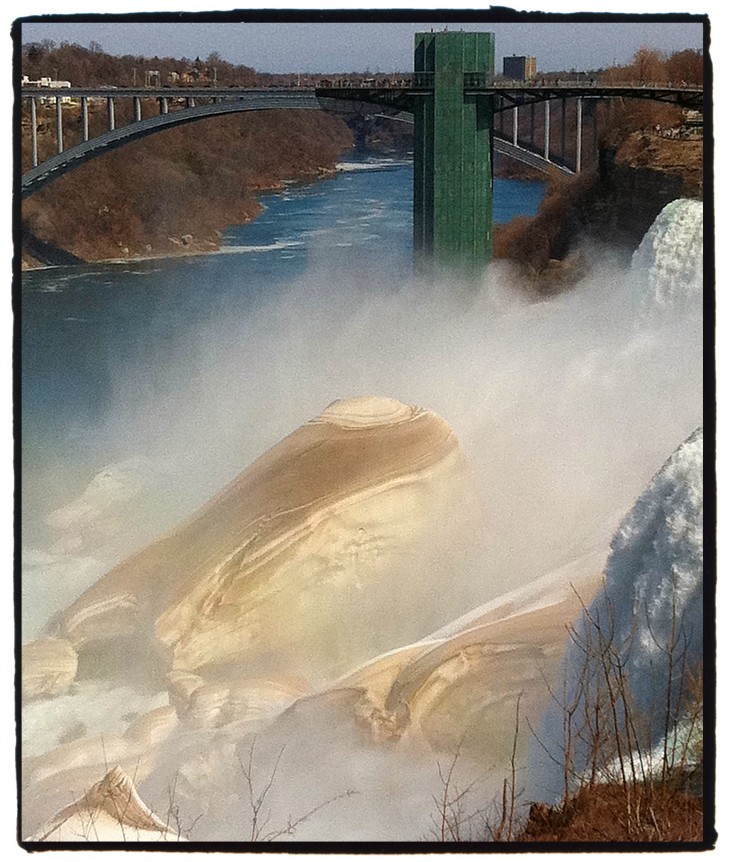
April 9, 2011 Ice forms on the rocks at Niagara Falls creating mountains of ice that resemble fluffer nutter. iPhone 4 camera with slight zoom edited with PhotoShop Express

What this commitment has done for me though is it has forced me to look and see again.  It has made me more aware of things around me, even the simple little things. I have always seen things but this commitment has made me appreciate them, think about them, record them and share them.  I am back to keeping notes of locations, looking at weather reports, reading event calendars and jotting down things of interest. Doing all this is much easier now with an iPhone than it was back in the days of using my little black Nikon book.

March 25, 2011 Crocus in the snow. On a spring walk earlier in the week I noticed the little crocus blooming. When 9 inches of snow fell that same week, I went back to check on them and make this photo. I admit the snow was starting to get old! iPhone 4 camera edited with PhotoShop Express.

Try to do this yourself.  If not a photo a day, try to make a photo a week or a photo every time you are together with friends. You will be surprised at the varied collection of memories you will have recorded after only a few months.  From day trips, dinners out, snow, sunshine and fog you will look back and remember the events that surrounded each photo.

So here are just a few more photos from my Photo a Day project.

Feb 2, 2011 Table with a view! La Jolla, CA, after a drive up the coast we had the best seat in the house to view the sunset. iPhone 3GS camera, ProHDR app edited with PhotoShop Express.

March 8, 2011 Folly Beach Lighthouse SC. I love exploring with my daughters, especially when you can go barefoot. iPhone 4 camera edited with PhotoShop Express.

April 8, 2011 another foggy day, but the fog gives me hope that warm weather is just around the corner. iPhone 4 camera edited with PhotoShop Express.

I hope you enjoyed the selection from my first three months.  I am also hoping that I won’t have anymore snow photos until next December!  Looking forward to seeing your photos.


I am often asked “what app do you use to get those great photos on your phone?”  Usually followed by “I have that app but it doesn’t work right!” I thought I had answered these questions but I guess it bears repeating since what I have to say is no secret!

Yesterday while attending an event for ASMP(a professional photographers association generally filled with talented people and lots of egos) a photographer was looking over my recent book of NYC iPhone photos and asked. “How do you do this?”  At first I was surprised by his question, I mean my goodness it seems rather obvious, doesn’t it?  I have a phone, I see something, I record it and then sometimes I obsess (more on this later) over editing it on my phone.  It is that simple! OR is it?

The Empire State Building

Here is how I do it.  I play with my phone like my mom played with those purse sized word search puzzles.  If I am waiting for a train, I make photos and play. If I am sitting in a lobby, I play or make new photos.  If I am riding in a car, I make photos and play. If I am just bored with the conversation, I play.   It is like having a darkroom in my coat pocket without the stinky chemicals.  In short make photos. Lots of them and then play with them.  Practice, practice, practice.  The more you try the better you will get.

The first thing is having the phone(or camera), and not being afraid to make pictures with it.  Move past “I need a real camera.” Past “people will look at me.” Way past “I can’t do this.”  Just take out your camera (I mean phone) and make photos.  If you don’t like the photo delete it!  No one needs to know.  Its not like the days of going to the drug store to pick up your envelope of out-of-focus bad prints that have been the amusement of all the high school aged lab techs.  Just make bad photos and delete them until you have a photo you like. Just keep making them.  Eventually you will figure out what works for you and it will be fun.  If it isn’t fun then for goodness sake don’t do it!

As I said in an earlier post, I use my phone camera to record the image and then “edit” the image in other apps.  I prefer to keep the image on file as I originally saw it. Apps like Hipstamatic are cool and I have seen lots of fun photos that people have made with it. It’s just not my favorite.  However, I recommend having it on your phone and playing with it.

For my daily iPhone photo post I always put the Photoshop Express “film emulsion” border on the image.  It is my personal signature to everyone that this is from my iPhone.

So here we go…

Java Cafe in Rochester, NY iPhone4 with Photoshop Express

iPhone camera

Play with the exposure/focus, practice makes perfect. Make several photos touching different spots on the image to change the focus or exposure it’s a good way to learn how the camera responds to light. It also helps you to see differently.  Remember the better the image is to begin with the better it will be in the end.  If you are getting lots of soft photos… One, make sure your lens is clean.  Two, use both hands to hold your phone and lightly touch it to make the photo. Three, set the phone against something to steady it. If you are still getting movement try holding your breath.  If all that fails, well… I don’t know, give up drinking coffee.

Photoshop Express

Basic steps.  Sharpen the image but only slightly.  Correct the exposure but be aware this adds contrast. Saturation can make a photo pop or be garish so use it wisely or creatively. Contrast can sometimes greatly improve the image. Crop and or straighten the image or be crazy and tilt the image! Add a border it you want.  Other options in PS Express I like: converting to B&W or vignette.  If you use the film emulsion border beware it will cut off some of the image.  To get around this put a white border on first, save it and then do the emulsion border.

Following are some examples of images and different apps I have played with on my iPhone.  In the order they are posted 1)above  iPhone with Photoshop Express $0   2) Hipstamatic $1.99   3) ColorSplash by Pocket Pixel $.99    4) PANO by Debacle Software  $1.99   5) Diptic by Peak Systems $1.99   6) Edwin Little $0  7) Lo-Mob $1.99 8) Pro HDR $1.99

A Live Oak in Charleston, SC iPhone3 with Hipstamatic app

I was visiting Hannah and shot this with the Hipstamatic app.  I like the photo but wish I had a straight image to play with.


Alayna's wedding SC shot by Hannah Edited in ColorSpash app

This wonderful photo was shot by my daughter at her best friends wedding last week.  I just had fun playing with it on my iPhone in ColorSplash deleting all the color but the flowers.  With ColorSplash you can have all kinds of fun painting things to B&W while keeping some color.


Ella in Philly shot with PANO app on an iPhone3

PANO is one of my favorite apps.  I don’t use it often but it is really fun.  You can make beautiful pano’s easily and if you have a willing subject have them show up in multiple places in the photo as you make it.  It basically stitches together several  individual photos into one photo, this one has five photos.


Playing with exposures then merged in the Diptic app

This was created with the Diptic app.  It is just an example of how an image changes just by shifting exposure. Here are four photos all shot at the same spot the only thing that changed is where I touched the screen to pick up exposure.  The Diptic app can be a fun app to show the changing of time or different outfits on your pets or children. It has multiple templates to combine 2, 3, 4 or more photos into one image.


Skippy edited in the Edwin Little app

The Edwin Little app.  It’s fun. Not my favorite but it is free.  It does decrease the size of your photo.


Paris and old photo edited in Lo-Mob app

This was created using the Lo-Mob app and an old photo from Paris.  Its fun to have on your phone to play with when you are bored. I would not say it is a must have.


South of the Border shot on iPhone4 using the Pro HDR app

Shot on the iPhone4 using Pro HDR.  One of my favorite apps especially at sunset and sunrise.

Don’t break the bank, you can get some fun photo apps for under 2 Bucks. Be creative, have fun, the worst that can happen is you delete the image if it looks bad. That’s the basics.  Now go have fun!

If you have any questions just post them in the comments and I will do my best to provide some answers. Thank you for reading.

It is almost springtime! The clocks have been changed and my Dad has tapped the Maple Trees. For me the beginning of syrup season always symbols the end of winter. This is a great opportunity to share with you photos from my trip home last spring to see my family and document (of course shot on my iPhone) the Curtiss Sugar Bush in operation.

My favorite photo from the trip is not one that I shot (it was made on an iPhone). It is of me with my dad, Stanley Curtiss the “CEO” of Curtiss Sugar Bush. I loved my short visit home and the opportunity to see my dad with three and four generations of Curtiss’ working side by side. It is a lot of work for them but the love and laughter shared in that steamy sugarhouse lasts a lifetime. If only the iPhone could capture the sweet smell of syrup steam.

Curtiss Sugar Bush

With my father, Stanley Curtiss in the Sugarhouse in 2010. photo by Mickey Osterreicher

It was also great fun to “document” the entire process on my iPhone. Continuing my theory that the best camera is the one you have with you. This was a slightly bigger challenge because of the lighting conditions. The Syrup operation goes all through the night so once the sun goes down there is limited light sources. Plus the steam was playing tricks on the iPhone  focus and exposure.

Remind yourself when you are enjoying family events or traditions to take out your camera or your phone and record a family photo story. Look for overall photos that help establish the environment or place the event. For example a photo of the driveway of your home. You know that feeling you get when you return after a long vacation. Think about relationships, not just smiling at the camera, but the interaction or feeling of isolation that happens when you are all together. Then look for the details . . . a photo of Grandma’s fruit salad or the rocking chair that everyone has sat in for 50 years . . . the  “product” shot.  Mostly just have fun and make photos, I am sure you will be glad you did when you are able to share the story with others who couldn’t be there. One word of advice… EDIT yourself, don’t be that person who makes people look at a thousnd bad family snapshots.  So enjoy my family story,  “Curtiss Sugar Bush”.

If you go to PAGES in the menu there are captions with the photos in a scrolling format.


Let’s talk about HDR – not in the way techie geeks or highbrow artists do, but how you would when you first use something and go wow that’s cool. I first learned of the Pro HDR app from my friend Jim when he was visiting in NYC. At first I thought hmmm that’s sort of cool. Then I tried it and I was convinced IT really is cool! I know some say it is over used and too artsy but really its fun, try it.

The fact that the iphone 4 has HDR built in was a deciding factor for me in upgrading. Still I use the ProHDR app ($1.99) more than the camera HDR and I will explain. Not that it is better but in certain situations it gives you more control.

Let me start by saying I am no expert, but I have done this enough that I have good and bad experiences with HDR I am willing to share. At the risk of “exposing” my tricks I will show a few examples here in my blog. I put the steps together in the Diptic app ($1.99) so you can see the process a bit. They show the dark image the light image and the finished product.  For my photographer friends that will be boring, ☺ but for my friends and family it might help explain the process so it will be a bit easier for you to use.

Evening walk in Granada, Spain

HDR is short for high-dynamic-range imaging (HDRI or just HDR). It essentially takes multiple images exposed for the highlights, mid-tones and shadows and then merges them into a single image that captures with greater detail the tonal range from shadows to highlights. Try playing around with the exposures, touching the screen to find the best dark and light exposures.  If it is to extreme it will look bad.  In the days of film we exposed for the highlights and developed for the shadows. Think of the zone system. You can manually do this but the fun here is the ease of the iPhone.

The reason I prefer the ProHDR app more often than the HDR in my iPhone 4 is the added control. I always keep the shadow and highlight images that way I can go back and do the merging again if I want. In the ProHDR you can manipulate the saturation, contrast, tint, exposure, etc to meet your creative style. Plus if you overdue it and trust me, you will… you can go back and start over. One thing I don’t like about the Pro HDR app is that you cannot use your zoom. In situations where you need to get closer and can’t you may be best using the camera HDR with the zoom.

A word of warning if you have people in the photo they need to hold still or you will have ghost like captures. This does allow you the opportunity to creatively use movement to enhance an image. Check out the Molina’s (windmill) photo, showing the windmill blades moving or the portrait of my daughter in Spain. She is sitting still but in the background the people walking are duplicated. One of my favorite HDR images is in the NYC gallery, the people over looking construction at ground zero.

So… play around with it when you can. You will be amazed at how often it can help you record an image that is closer to what your eye could see but the ordinary camera can’t capture. It is especially wonderful at sunsets!!
Enjoy!!


Riding the Carousel in Binghamton, NY.

For the last year or so I have made light of my iphonotos(no pun intended). I am not making light of the images themselves or peoples appreciation of them, but light of my current “camera” of choice.  These images have been more about my journey than the photography. However, I still record the images with the same photojournalism foundation I firmly believe is important.  I don’t change the content in the photo or ask others to move.  It is “As I see it…”

I like to play with new apps and experiment with light and movement.  Often I shoot the same subject with multiple apps, multiple focus spots, multiple exposures and various zooms, just to see the different results.  Much like I did with my camera bag with its multiple lenses, filters, flashes and films.  After the image was captured, came the ongoing decisions of how to “soup” that film and ultimately print the image for the world to see.  We all had our standards, we knew instinctively what film, what filter, what developer etc. was required to capture a specific event.  We dodged, burned, cropped, over exposed, under developed, but never changed the content of the original subject.  We helped our “readers” see what we thought was the most important element of a story.   It was what made good photographers better and good editors invaluable, knowing what tool and what crop would allow them to tell a compelling visual story. Like my favorite F3 with short zoom lens, I usually go back to just the straight iPhone camera and Photoshop Express (free) as my favorite apps of choice.  (Ok,  I love the ProHDR($1.99) app but more on that later.) In the end, I like the apps that let me keep the original image as it is, not manipulated or altered.  That way I can always go back to the foundation to rebuild when I experiment.  There are so many wonderful apps available that create a mood.  The key is the subject – the emotion or the reaction remain the same – it should still be about the content.  The mood of the image may change but the “story” is intact.  I would not have this photo of my daughter laughing on a merry-go-round but that I had my phone in my pocket.  I love the genuine child like laughter of my often too serious college grad, for me the phone photo was perfect for this moment.

All this brings me to an “As I see it…” conversation.  Recently New York Times photographer Damon Winter won a third place award in the Feature Picture story in the Pictures of the Year International, (POYi) contest for his feature “A Grunt’s Life” shot on his iPhone using the Hipstamatic app($1.99).  It has sparked all sorts of discussion and controversy.  Some say the use of the app changes the reality of the scene; others question the use of the iphone entirely.  But Damon says it best in his statement to Poynter.org.  “I could not have taken these photos using my SLR and that perhaps is the most important point regarding my use of the camera phone for this story.”   I like the picture story, especially the moments in the images, where we as the observer get to see our soldiers in their daily routine, the boredom, the exhaustion, the camaraderie and the environment they endure daily.  Thank you, Damon, for making this possible.  Nice Work!

Check out his work at:  http://lens.blogs.nytimes.com/2011/02/11/through-my-eye-not-hipstamatics/

Also read the story on Poynter.org:  http://www.poynter.org/how-tos/newsgathering-storytelling/118898/live-chat-friday-what-role-do-image-apps-like-hipstamatic-have-in-photojournalism/